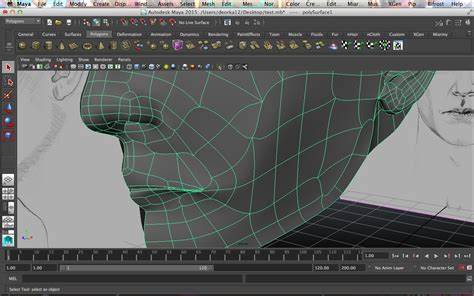
Look closely at any 3D model — a game character, a car, a building in a render — and the curves are a lie. There are no curves. There's a net of flat polygons, thousands of tiny straight-edged tiles, angled just so that your eye reads the whole thing as smooth. Polygon modeling is the craft of building and arranging that net, and it's the foundation under nearly everything in games, film, product design and architectural visualization.
It's powerful because it gives you direct, total control over the surface. It's tricky because that same control means you can build a mess — a model that looks fine until you light it, render it, or try to animate it, at which point the bad decisions you made hours ago all show up at once. So let's build the mental model from the ground up, one piece at a time.
The vocabulary, in dependency order
You can't reason about a mesh until these words mean something, so here they are in the order they build on each other:
- A vertex is a single point in 3D space — the corner of a polygon.
- An edge is the line connecting two vertices.
- A face is the flat surface enclosed by three or more edges. Vertices make edges; edges make faces. That's the whole hierarchy.
- A normal is a vector sticking out perpendicular to a face, and it's quietly critical: it decides which way the surface is "facing," and therefore how light bounces off it. Flip a normal by accident and a surface goes black or inside-out.
- A loop is a continuous run of connected edges or faces flowing in one direction; a ring is a set of parallel loops, evenly spaced. Loops are how you steer detail around a form — around an eye, along a wall, down a column.
And four operations do most of the actual shaping: extrusion (push existing geometry out to make new faces), beveling (add width or depth to an edge or vertex), chamfering (round or soften an edge), and subdivision (split faces into smaller ones for more detail).
Tris, quads, and the ones to avoid
Faces come in three flavours, and which you use is not a cosmetic choice:
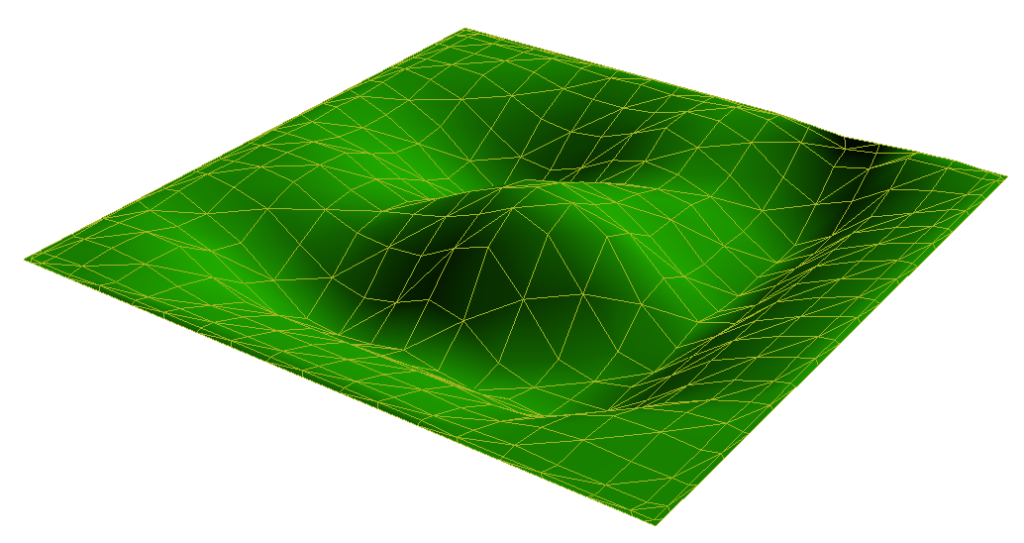
- Triangles (tris) — three sides. The renderer ultimately converts everything to tris, because three points always lie on a flat plane. Unavoidable and reliable.
- Quads — four sides. The modeller's preferred currency: they subdivide cleanly, they deform predictably when animated, and edge loops flow naturally through them. Aim for quads while you work.
- N-gons — five or more sides. Tempting as a quick fix, dangerous as a habit. They can render unpredictably and crease badly when subdivided. Use them as scaffolding, not structure.
Four ways to actually build
There's no single "polygon modeling" technique — there are several, each suited to a different kind of shape:
| Technique | Start from | Best for | The catch |
|---|---|---|---|
| Box modeling | A primitive (cube/sphere), refined by extrude/bevel/subdivide | Hard surfaces: buildings, vehicles, furniture | Easy to end up with messy topology |
| Edge modeling | A single edge or curve, built out edge by edge | Organic forms: characters, animals, plants | Slow; can leave gaps if you're not careful |
| Spline modeling | Curves/splines defined by control points | Smooth, precise shapes: logos, fonts, jewelry | Converting splines to clean polys is fiddly |
| Sculpting | Pushing a high-res surface like digital clay | Realistic detail: faces, skin, hair | Huge files; needs the right software/hardware |
Most real projects mix these — block a building with box modeling, sculpt the worn details, snap the precise bits with splines.
The one that matters most: topology
If you remember a single phrase from this article, make it plan your topology. Topology is how your vertices, edges and faces are arranged across the surface — the layout of the net, not the shape it forms. Good topology means the edge flow follows the form: loops running with the muscles of a face, around the curve of a column, along the lines of a wall.
Why obsess over it? Because everything downstream depends on it. Bad topology renders with weird shading artifacts, subdivides into lumps, and — if the model ever has to move — deforms like a crumpled bag. Good topology, mostly quads with clean loops, just behaves. It's the difference between a model that looks done and one that is done.
The habits that keep models clean
The rest of the craft is mostly discipline. The ones that earn their keep:
- Start simple, then refine. Block the big forms first — the "blocking out" pass — and add detail in layers. Don't sculpt a nostril before you have a head.
- Use symmetry. For anything mirrored — a face, a car, a building elevation — let the software mirror one side onto the other. Half the work, perfect consistency.
- Snap for precision. Snapping vertices and edges to a grid, point or axis is non-negotiable for architecture and machined parts, where "close enough" isn't.
- Model non-destructively with modifiers. Modifiers apply effects on top of your geometry without baking them in, so you can experiment and back out of mistakes instead of living with them.
- Organize with layers, lean on reference images for real proportions, and — the unglamorous truth — practice, get feedback, and be patient. Topology sense is built model by model; there's no shortcut, only reps.
The bottom line
Polygon modeling is equal parts art and engineering: creative freedom resting on a surprisingly strict set of structural rules. Master the vocabulary, respect the topology, pick the technique that fits the shape, and the medium opens all the way up — virtual worlds, animated characters, buildings that don't exist yet.
The challenges are real, but none of them are mysterious once you can see the net underneath the curve. Build that net well, and everything you make on top of it — the lighting, the animation, the render — gets easier. Build it carelessly, and you'll pay for it later, every single time. Roll up your sleeves and start with a cube.