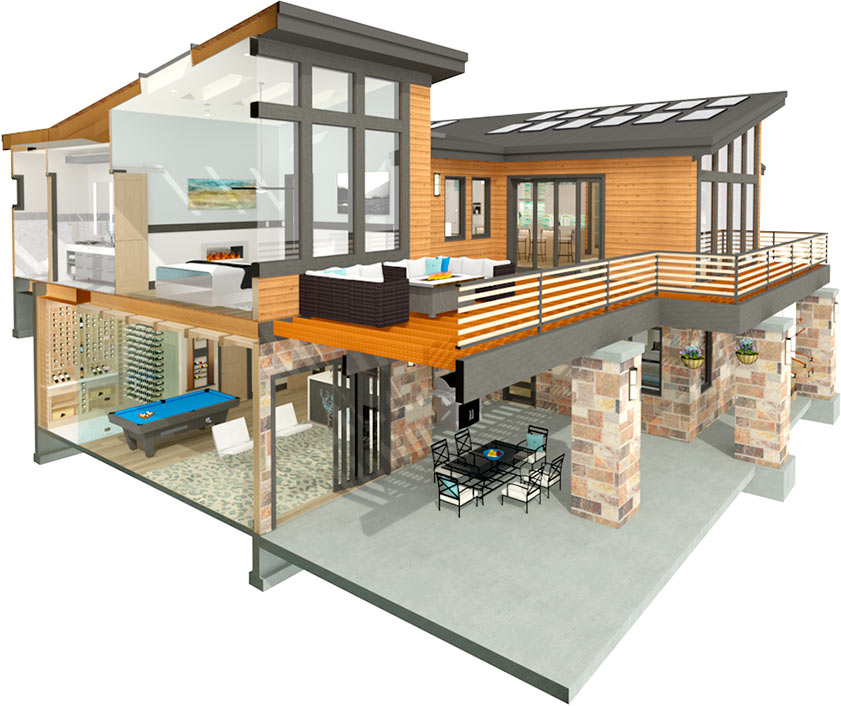
General-purpose 3D software is gloriously, uselessly ignorant. It will let you draw a wall, a banana, or a wall shaped like a banana with equal enthusiasm, because it has no idea what any of those things are. That flexibility is the whole point — and it's also why drawing a house in it means manually specifying every stud, rafter and railing yourself.
Chief Architect makes the opposite bet. It assumes, from the first click, that you are designing a home. It knows what walls, roofs, stairs, cabinets and decks are, and how they're supposed to fit together. And once a piece of software knows it's building a house, it can do something the blank-canvas tools can't: it can frame your roof for you. That single assumption — specialist, not generalist — is the key to understanding everything Chief Architect is good and bad at.
The payoff of knowing it's a house
Watch what that domain knowledge buys you. Draw a floor plan and automatic roof generation puts a roof on it — pitched, with overhangs, in a style you can adjust — because the software understands how roofs relate to the walls beneath them. The X15 release pushes this further with automatic truss framing: one click generates the roof and floor trusses, structural members you'd otherwise place by hand, ready to edit.
This is the difference between a tool you instruct and a tool that anticipates. A general modeler would make you build every truss as dumb geometry. Chief Architect builds them as trusses, because it knows that's what a roof needs. The whole program runs on that logic — a rich library of doors, windows, cabinets, furniture and fixtures that already know what they are, snapping into a design that already knows it's a building.
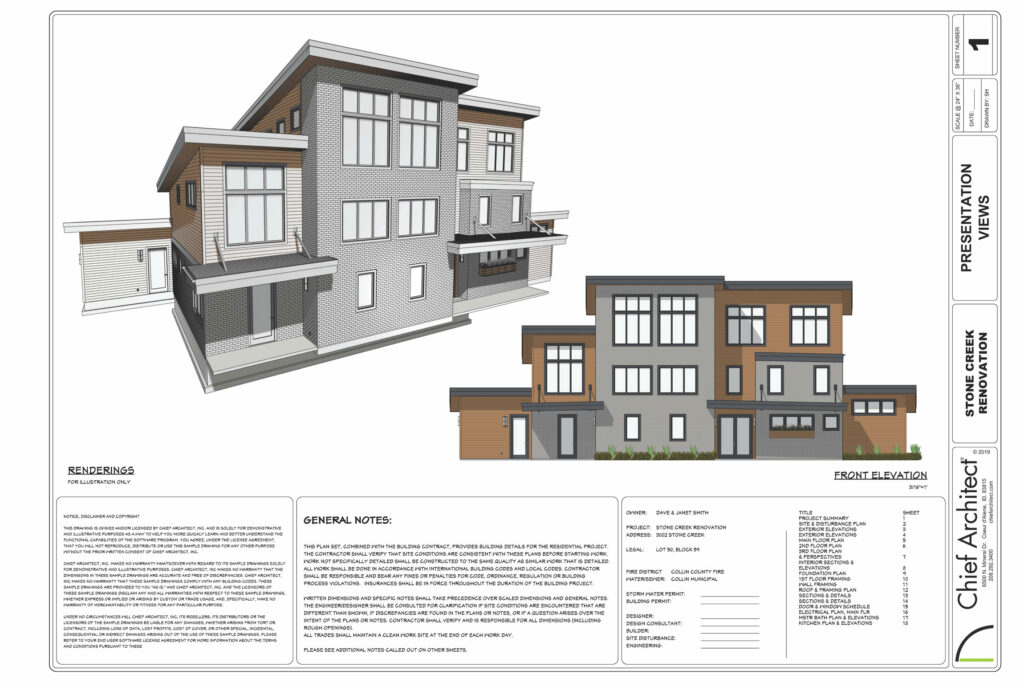 A Chief Architect home design
Who it's actually for
The specialism narrows the audience and sharpens the fit. Chief Architect is aimed squarely at residential work — and within that, it's broad: professional architects and designers, builders, and serious DIY homeowners all use it for:
- Custom homes from scratch, with control over every style, material, colour and finish.
- Remodeling, where the Reference Display feature is genuinely clever — superimpose the as-built over the proposed remodel in 3D and see exactly what changes.
- Interior design, furnishing and finishing spaces from the object library with real materials, textures and adjustable lighting.
- Landscape design — decks, patios, pools, planting, even terrain models with contour lines to match the site.
What's new in X15
The X15 update is mostly about removing friction:
- Live Material Lists that update in real time as you change the plan — quantities and costs that stay honest — with snapshots saved as reports.
- Automatic truss framing (above) for roofs and floors in one click.
- Reference Display for the as-built/remodel overlay.
- Deck railing and stair offsets for precise control of posts, newels and balusters.
- A redesigned Library Browser with better search and cloud access, plus the ability to bank your own 3D solids for reuse.
- 3D Solid Editing to reshape any solid and convert it into cabinets or fixtures, and Construction Lines for grid-based alignment.
Round it out with high-quality rendering and STL export for 3D printing a physical model, and you've got a full residential pipeline from sketch to construction documents.
What it needs, and the quirks
Modest, by professional-software standards: Windows 10/8/7 (64-bit) or macOS Monterey/Ventura, a multi-core processor, 8 GB RAM, a dedicated 2 GB graphics card, and 5 GB of disk. One sharp edge to note — Premier isn't supported on Windows ARM machines. If it stutters, the official fixes are pragmatic: disable shadows and anti-aliasing, drop the max light count, turn off cross-section controls, and run on a single screen.
Support is a real strength. There's tiered technical support (priority for Software Assurance customers on X14/X15, 7am–4pm Pacific), thorough downloadable manuals and tutorials, a deep knowledge base, and the ChiefTalk forum — where, usefully, the training, support and engineering teams actually show up to answer questions.
What it costs
Simple and, for what it does, reasonable:
| Plan | Price |
|---|---|
| Monthly | $199/month |
| Annual | $166.25/month (save 16%) |
Subscriptions bundle in Support & Software Assurance. There's a free trial (limited — no printing, saving, exporting or virtual tours) plus a 2-week money-back guarantee on the full version, and volume pricing for 10+ licenses. (List prices at time of writing; check current rates before budgeting.)
The honest scorecard
Where it wins: a clean, approachable interface; powerful, residential-specific automation (roofs, trusses, material lists) that saves enormous time on exactly the work it targets; deep customization; excellent documentation and support; and pricing that's fair for the capability.
Where it strains: there's still a learning curve if you're new to 3D — "user-friendly" doesn't mean "instant." It wants a dedicated GPU and will lag on old or low-end machines. And the subscription, while reasonable, is an ongoing cost some users would rather not carry.
The bottom line
Chief Architect is a clinic in the power of specialization. By giving up the right to model anything, it earns the ability to model homes brilliantly — anticipating the roof, framing the trusses, listing the materials, all because it never has to wonder what you're building. For residential design, remodeling and interiors, that focus makes it one of the most productive tools available, and a genuinely strong recommendation.
The flip side is the obvious one: it's a home-design tool, not a general modeler or a BIM platform for a 40-storey tower. If your work is residential, that's not a limitation — it's the entire reason it's so good. If it isn't, look at a generalist like SketchUp or a BIM tool like ArchiCAD instead. Try the free version, throw a real project at it, and the fit will be obvious within an afternoon.