
Here's the problem with telling an AI to draw your building: it doesn't listen.
You type "modern glass and steel office, six storeys, corner site," and you get a modern glass-and-steel office — gorgeous, confident, and nothing like the massing you sketched. Five storeys. Wrong corner. A balcony you never asked for. Standard text-to-image diffusion models take your words as a vibe, not a spec, and for an architect — whose whole job is that the walls go exactly here — a vibe is useless.
ControlNet is the fix. It lets you hand the AI a second input alongside your words: a sketch, an edge map, a depth map — a visual instruction that says keep this structure. The text still sets the style; the image now sets the geometry. And the way it pulls this off without wrecking the underlying model is genuinely clever, so let's actually open it up.
The trick: don't retrain the genius, supervise it
A model like Stable Diffusion has, at great expense, learned what the visual world looks like. The naïve way to add control would be to retrain it on your new constraints — which risks lobotomizing the very knowledge that makes it good. That's the obstacle: how do you teach an expert a new rule without making it forget everything else?
ControlNet's answer is to make a copy. The architecture runs two networks side by side:
- A locked copy of the pretrained diffusion model. Frozen. Untouched. All that hard-won knowledge of light, material and form stays exactly as it was.
- A trainable copy that learns one job: how to read your conditioning image and translate it into guidance.
Between them sits the elegant part — the zero convolution layer. It's a connection that starts with its weights set to zero. Think about what that means on the first training step: the trainable branch contributes literally nothing, so the model behaves identically to the untouched original. It can't do harm because it isn't doing anything yet. Then, gradually, training nudges those weights off zero, and the conditioning branch learns to whisper to the frozen genius — "the edges go here" — without ever shouting over its expertise.
So the model never has to choose between knowing how to render and doing what you ask. The lock keeps the knowledge; the zero-init connection adds the obedience, one careful increment at a time. That's the whole insight.
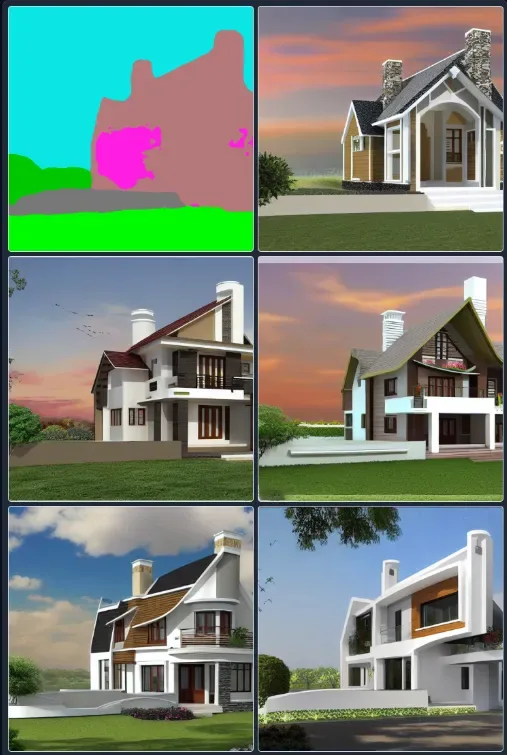 Source: https://github.com/lllyasviel/ControlNet
What you can hand it: the conditioning inputs
The control comes from what you feed the trainable branch. Each input type constrains a different property of the output:
| Conditioning input | What it is | Architectural use |
|---|---|---|
| Canny edge detection | Finds edges and outlines | Lock building outlines and key features; keep structure honest |
| User sketches | Your hand-drawn or digital lines | Turn a concept sketch into a render while preserving intent |
| Depth maps | Encodes how far each pixel is | Accurate 3D feel and spatial relationships, great for interiors |
| Segmentation maps | Splits the scene into regions | Assign materials/areas; clean boundaries between elements |
| Normal maps | Encodes surface orientation | Surface texture, realistic materials, better lighting and shadow |
| Human pose | A skeleton of figures | Design to human scale; place realistic people in presentation renders |
The headline use is the first two: sketch in, render out. You draw a façade on a tablet, run an edge detector over it, hand ControlNet the edges plus the prompt "modern glass and steel office façade," and get back a photoreal image that keeps your lines and adds the textures, reflections and light. The gap between "idea in my head" and "image I can show a client" collapses from days to minutes.
How a single generation actually flows
Step by step, so it's not a black box:
- Input. You give a text prompt and a conditioning image (say, the edge map of a building).
- Dual processing. Both networks see the input — the frozen one brings its rendering knowledge, the trainable one interprets your constraint.
- Zero-conv merge. Their outputs combine through the zero-convolution bridge, which has learned how much of the conditioning to apply.
- Guided diffusion. That combined signal steers the denoising — the model sculpts random noise into an image that satisfies both the words and the geometry.
- Iterate. Don't like it? Adjust the prompt, the input, or the strength, and run again.
Compared to plain text-to-image, you've traded unpredictability for intent. Same engine; a steering wheel bolted on.
Getting started
ControlNet runs on the standard Python ML stack. You'll want Python 3.7+, PyTorch for the network math, Hugging Face's Diffusers and Transformers for the models and text handling, and OpenCV for prepping inputs like edge maps:
pip install torch diffusers transformers opencv-python
Three modes cover most architectural work. Text-to-image: load a ControlNet model plus a base diffusion model, prepare your conditioning image, add a prompt, run the pipeline. Image-to-image: same, but you also pass an existing image to modify — ideal for iterating on a render. Inpainting: supply a mask marking the region to change, perfect for "keep the building, just redo this façade."
A practical note that's easy to skip and shouldn't be: your output is only as good as your conditioning input. Clean, clear sketch lines beat messy ones. With edge detection, the threshold is a dial worth turning — too sensitive and you get noise, too coarse and you lose the building. Spend the extra two minutes on the input; it saves twenty on the output.
When you're ready to push it
- Multi-ControlNet stacks several inputs at once — a sketch for the structure, a depth map for the space, a segmentation map for the materials — for tightly specified results.
- Guess mode drops the text prompt entirely and lets ControlNet interpret the conditioning image alone. Great for fast, prompt-free sketch visualization, and occasionally for the happy accident that sparks a new direction.
- Fine-tuning trains ControlNet further on a dataset of your own style or project type, so a firm with a signature aesthetic gets a model that defaults to it.
The limits, said plainly
ControlNet is powerful, not magic. There's a real learning curve. High-quality generations are computationally heavy. Consistency across many images is much better than it used to be but still not perfect. And very fine architectural details sometimes get simplified or misread — the model is approximating, not drafting.
Then the considerations that aren't technical at all. AI output can echo copyrighted work, so check what you're publishing. Be transparent with clients about where AI entered the process. And mind the training-data bias the model inherits without telling you.
Which leads to the one worth sitting with. ControlNet is so good at turning a scribble into a finished-looking render that it quietly moves the bottleneck. The slow part used to be making the image; now the slow part is deciding whether the image is any good — and a photoreal render is extraordinarily persuasive even when the idea underneath it is thin. So, yes, we can now generate a stunning building from a ten-second sketch. We absolutely can. Whether a tool that makes unfinished thinking look finished is helping us design better, or just helping us decide faster — that's, uh... the question the render is very pretty at not asking.
Where it's heading
The roadmap points at easier fine-tuning, tighter integration with CAD and BIM, real-time generation as hardware catches up, and research into generating actual 3D models rather than 2D images. For practice, that means faster prototyping, clearer client communication, and — maybe the biggest shift — smaller firms producing visuals that used to require a big studio's budget.
The bottom line
ControlNet closes the gap that made AI imagery a parlour trick for architects: the lack of control. By keeping a frozen expert and teaching a small obedient copy to steer it, it gives you renders that honour your geometry instead of improvising past it. Learn it, respect its limits, and keep your own judgment in the loop — it stays a tool that augments your craft rather than replacing it. If you want the broader picture of where these tools fit, start with the rise of AI tools in architecture, and for prompt craft, the Midjourney tips guide.